


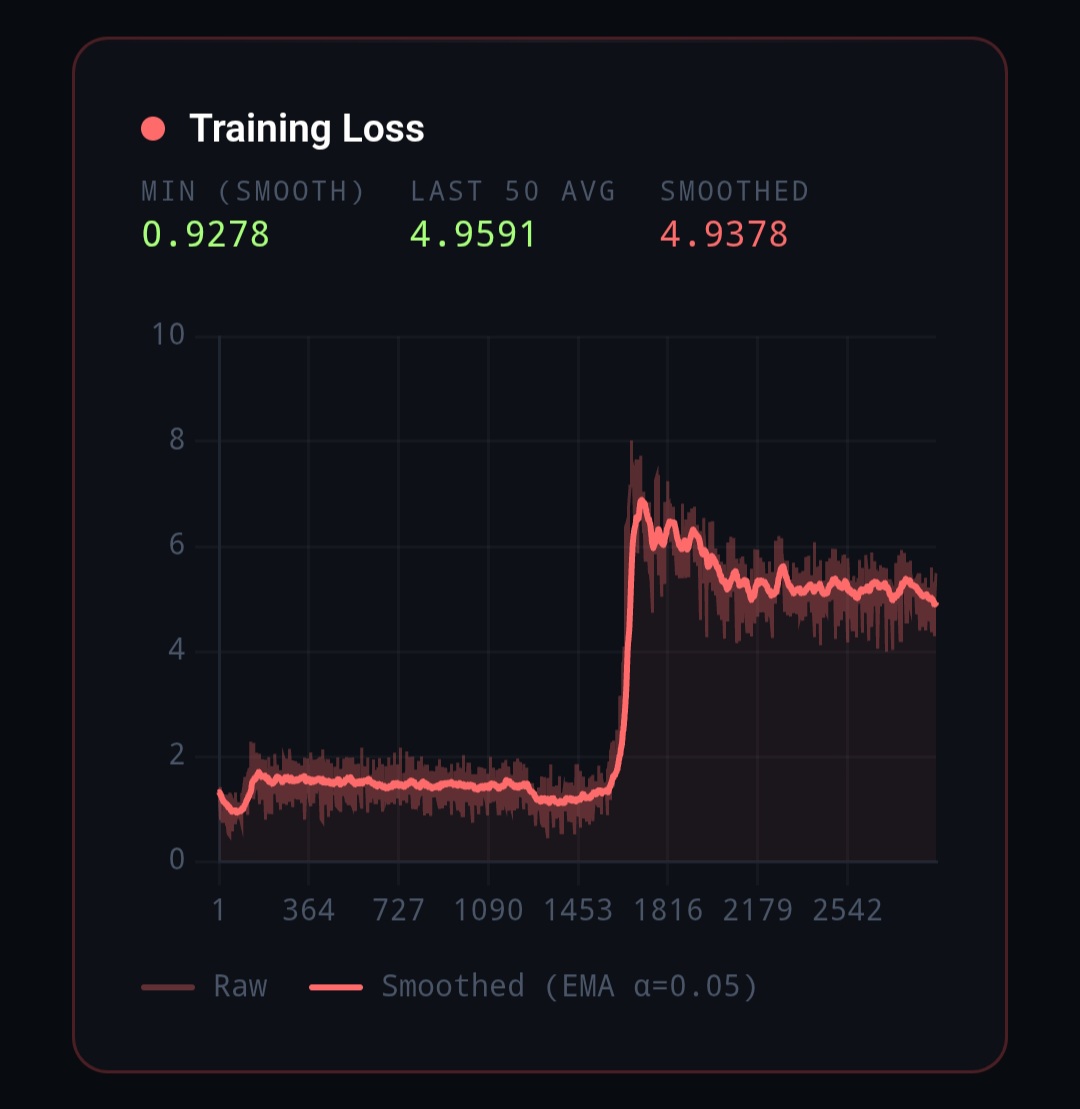

I am using a combined shuffled dataset that consists of high reasoning claude opus 4.5, 4.6, and gemini 3 pro messages from huggingface itself. Even if i lower the lr it keeps exploding at a further step.
1 Like
When it comes to failures specific to fine-tuning newer Qwen models like Qwen 3.5, <think>-related issues are the first to be suspected.
My diagnosis
This looks much more like a formatting / masking / tokenizer / precision problem than a pure learning-rate problem.
Why: in the curves you shared, training is usable for a while, then there is a sharp regime change: loss jumps, grad norm becomes erratic, and the run degrades even though LR is already past warmup and moving down. That pattern matches “a subset of batches is pathological” better than “the global step size is too high.” TRL’s own docs also note that adapter training commonly uses a higher LR around 1e-4, so a run failing at 1e-5 or 2e-5 is a strong hint that something else is wrong first. (GitHub)
The most likely causes, ranked
1) Your data is probably mismatched to how Qwen3.5 expects reasoning to look
Qwen3.5 is not just a generic chat model. Its current docs say it thinks by default before responding, and direct non-thinking responses are obtained by explicitly disabling thinking in the chat-template/API configuration. The Qwen docs and model card also recommend standardized formatting for outputs, and for Qwen3 they explicitly note that historical turns should keep only the final output, not the thinking content, unless your framework is handling that correctly for you. (Hugging Face)
That matters because your training data is a shuffled mixture of reasoning-heavy outputs from different teacher families. Even if the content quality is high, the target format is likely inconsistent:
- different reasoning style
- different boundary between reasoning and final answer
- some samples may be answer-only
- some may be long enough that the useful supervised region gets truncated
- some may include reasoning patterns that do not align with Qwen’s template assumptions
Online Qwen training guidance does not recommend casually mixing arbitrary reasoning traces. Qwen’s own training docs say that if you fine-tune with data without chain of thought but want to preserve reasoning ability, you should handle it explicitly with things like ignore_empty_think or a non-thinking prefix / instruction, rather than letting formats mix implicitly. The ms-swift Qwen3.5 examples also use add_non_thinking_prefix, ignore_empty_think, bfloat16, max_length 2048, warmup_ratio 0.05, and a LoRA LR of 1e-4, which reinforces that the recommended baseline is a controlled format, not raw mixed reasoning dumps. (Qwen)
My view: this is the highest-probability root cause in your case.
2) Assistant-only masking or truncation is probably breaking supervision on long samples
This is one of the closest known failure modes.
TRL’s SFT docs say assistant_only_loss=True only works for templates that can return the assistant token mask correctly. They also document that truncation matters, and a recent TRL issue shows a concrete failure: when assistant tokens occur only after max_length, assistant_masks can become all zeros, which leads to labels that are entirely -100. (GitHub)
That maps directly onto your setup:
- reasoning-heavy teacher outputs are long
- long samples are more likely to push the actual assistant answer past
max_length - once that happens, some batches have almost no meaningful supervision
- those batches produce nonsense gradients or highly erratic updates
This is exactly the kind of thing that lowering LR does not fix. It just delays when the optimizer encounters enough bad batches to visibly break.
3) Chat template / EOS handling is a very strong suspect for Qwen-family SFT
Transformers’ chat-template docs are explicit: chat templates already include the necessary special tokens, and if you format with apply_chat_template(tokenize=False) and then tokenize again with add_special_tokens=True, you can accidentally duplicate BOS/EOS/control tokens and hurt performance. They specifically say apply_chat_template(tokenize=True) is often safer for that reason. (Hugging Face)
There is also a TRL issue specific to Qwen where _prepare_dataset() appended an extra EOS token for Qwen chat formatting, creating endings like <|im_end|>\n<|im_end|>. That is exactly the kind of subtle corruption that does not always fail immediately, but can create unstable late-training behavior. (GitHub)
So if your pipeline is doing any of the following, it is dangerous:
- applying a chat template manually and then letting the trainer apply one again
- formatting text first, then tokenizing later with
add_special_tokens=True - mixing teacher-formatted strings with model-native chat formatting
- manually appending EOS / turn-end markers on top of a tokenizer that already does it
This is a top-tier suspect.
4) If you are on a Qwen 4-bit stack, a wrong pad token can literally cause exploding gradients
There is a recent Qwen-specific bug report showing that some 4-bit tokenizers used the wrong pad token: '<|vision_pad|>' instead of '<|endoftext|>'. The report says this caused NaN gradients and exploding training when padding was present, especially with batch size greater than 1. (GitHub)
This is not my first guess if your true microbatch is always 1 and packing is off. But it becomes highly relevant if any of these are true:
- packing is on
- your collator still pads aggressively
- your “batch size 1” screenshot does not match the actual runtime
- some wrapper in your stack mutates the tokenizer config
This check is cheap and important.
5) FP16 and 8-bit optimizer choices may be amplifying the problem
PyTorch’s AMP docs warn that fp16 does not work for every model, and explicitly note that many bf16-pretrained models cannot operate safely in fp16’s much smaller numerical range, which can cause gradient overflow. PyTorch and Transformers both point out that bf16 has a much larger dynamic range than fp16 and is generally the safer mixed-precision mode when hardware supports it. (PyTorch Docs)
bitsandbytes’ docs say 8-bit optimizers are most beneficial when memory pressure comes from many trainable parameters, and recommend StableEmbedding for NLP stability. In a LoRA setup, you are only optimizing a relatively small adapter set, so the upside of adamw_8bit is usually smaller than in full-parameter training. That makes it a poor choice for debugging stability, because it adds another quantized component without buying you as much. (Hugging Face)
So I would treat precision and optimizer as amplifiers, not the root cause:
- bad batch or bad masking creates ugly gradients
- fp16 / 8-bit optimizer makes the ugliness more visible
- the visible symptom becomes “loss explosion”
6) Added special tokens can break LoRA training unless embeddings are also trainable
The Qwen repo explicitly warns that if your training introduces new special tokens during LoRA fine-tuning, you need to make the relevant layers trainable via modules_to_save; otherwise the model may not learn those tokens properly. (GitHub)
This matters if you introduced any custom markers such as:
<analysis><reasoning>- custom teacher separators
- synthetic
<final>tags - any delimiter not already native to the checkpoint/tokenizer
If you did, remove them first for debugging, or train the relevant embeddings/output layers correctly.
What I think is happening in your case
My best current explanation is:
a subset of your reasoning-heavy mixed dataset is being converted into a Qwen3.5 training sequence incorrectly, and when those malformed or weakly supervised examples hit, gradients spike; lower LR only postpones that encounter.
That explanation fits:
- the shape of the curves you shared
- known TRL masking/truncation behavior
- known Qwen chat-template pitfalls
- known Qwen 4-bit pad-token bugs
- the fact that reducing LR delays rather than cures the failure (GitHub)
What I would do, in order
1) Run the most boring possible debug configuration
Use this first:
per_device_train_batch_size = 1
gradient_accumulation_steps = 4 or 8
learning_rate = 5e-5
warmup_ratio = 0.03
max_grad_norm = 0.5
weight_decay = 0.0

packing = False
assistant_only_loss = False
completion_only_loss = False  # if applicable
group_by_length = False
max_length = 1024  # maybe 2048 later

optim = "adamw_torch"
bf16 = True   # if hardware supports it
fp16 = False
Why this setup:
assistant_only_loss=Falseremoves one major masking failure mode while debuggingpacking=Falseremoves packed-sequence boundary problems- plain AdamW removes 8-bit optimizer noise
- bf16 reduces overflow risk
- shorter context reduces truncation pressure
5e-5is conservative but still reasonable for LoRA SFT once the data path is correct (GitHub)
Do not optimize for speed yet. Optimize for interpretability.
2) Overfit a tiny, hand-cleaned subset
Take 64–128 examples and inspect them manually.
Keep only rows that are:
- one clean user turn
- one clean assistant turn
- no duplicate special tokens
- no weird teacher artifacts
- no ultra-long rambling reasoning block
- no custom tokens unless you truly need them
If this subset trains cleanly, your framework is probably fine and the larger dataset contains toxic rows. If this subset still blows up, the problem is more likely tokenizer / template / precision. That is the fastest split between “data problem” and “stack problem.”
3) Normalize the dataset into one mode
Do not train on a random soup of teacher traces.
Pick one:
Mode A: thinking training
Normalize every assistant response into one consistent structure, for example:
- reasoning block
- final answer
Mode B: non-thinking training
Strip chain-of-thought and keep only the final answer.
This recommendation follows directly from Qwen’s own training guidance. Their docs say that if you fine-tune with data that lacks chain-of-thought but want to preserve reasoning ability, you should handle that explicitly with ignore_empty_think or a non-thinking instruction/prefix. The Qwen3.5 examples similarly use add_non_thinking_prefix and ignore_empty_think in the fine-tuning recipe. (Qwen)
For your use case, I would personally start with non-thinking training first. Mixed external reasoning traces are a harder target to get right.
4) Inspect supervision density on real batches
For several batches, print:
- total sequence length
- number of labels not equal to
-100 - first/last supervised tokens after masking
- whether the assistant answer survives truncation
Example:
batch = next(iter(trainer.get_train_dataloader()))
labels = batch["labels"]
counts = (labels != -100).sum(dim=1)
print("supervised token counts:", counts.tolist())

for i in range(min(4, labels.size(0))):
    kept = labels[i][labels[i] != -100]
    print(f"\nExample {i}: {kept.numel()} supervised tokens")
    if kept.numel():
        print(tokenizer.decode(kept[:120], skip_special_tokens=False))
If you see examples with almost no supervised tokens, or only fragments of a reasoning scaffold, you likely found the trigger. This is exactly the family of failure described in the TRL masking/truncation issue. (GitHub)
5) Verify the tokenizer configuration explicitly
Print this once at startup:
print("pad_token:", tokenizer.pad_token, tokenizer.pad_token_id)
print("eos_token:", tokenizer.eos_token, tokenizer.eos_token_id)
print("bos_token:", tokenizer.bos_token, tokenizer.bos_token_id)
print("model pad_token_id:", model.config.pad_token_id)
print("model eos_token_id:", model.config.eos_token_id)
print("special_tokens_map:", tokenizer.special_tokens_map)
What to look for:
- wrong pad token, especially
'<|vision_pad|>' - unexpected EOS/token-end behavior
- duplicated or custom special tokens you forgot about
The pad-token check is especially important if you are using a recent Qwen 4-bit stack. (GitHub)
6) Verify you are not double-applying the chat template
Bad pattern:
text = tokenizer.apply_chat_template(messages, tokenize=False)
enc = tokenizer(text, add_special_tokens=True, return_tensors="pt")
Safer patterns:
enc = tokenizer.apply_chat_template(messages, tokenize=True, return_tensors="pt")
or
text = tokenizer.apply_chat_template(messages, tokenize=False)
enc = tokenizer(text, add_special_tokens=False, return_tensors="pt")
Transformers’ docs are explicit that adding special tokens again after chat templating can duplicate them and hurt training. (Hugging Face)
7) Temporarily stop using assistant-only loss
While debugging, turn it off.
Reason: TRL clearly states that assistant-only loss depends on chat templates that support returning assistant masks correctly, and we already know truncation can silently zero out those masks. Until you verify the data path, the extra selectivity is not worth the risk. (GitHub)
Once the boring run is stable, re-enable it.
8) If you added any special tokens, either remove them or train embeddings properly
If your preprocessing added new delimiters, either:
- remove them completely for the first stable run, or
- make the needed embedding/output layers trainable as Qwen recommends
This is a less common cause than masking/template issues, but when it is present it can quietly poison training. (GitHub)
A practical decision tree
If the run blows up at roughly the same step every time
That usually means a specific toxic region of the dataset.
Action:
- log dataset indices per batch
- dump the batch right before the failure
- decode the exact formatted text and labels
If it blows up at different steps each run
That leans more toward a numerical issue:
- fp16 overflow
- wrong pad token
- 8-bit optimizer sensitivity
- packing/padding nondeterminism
Action:
- switch to bf16
- switch to plain AdamW
- disable packing
- keep batch size at 1
- re-check tokenizer special tokens
What I would not focus on first
I would not spend the first day sweeping LR from 1e-4 to 1e-6.
Why not: both TRL and Qwen’s own example configs show that LoRA SFT commonly lives around 1e-4 once the data/template path is correct. If your run is exploding even after dropping well below that, LR is more likely the volume knob than the broken component. (GitHub)
My probability ranking
For your case, I would rank the causes like this:
- dataset format mismatch / inconsistent teacher reasoning traces
- assistant masking or truncation removing the actual supervised target
- double chat templating / duplicate special tokens / extra EOS
- wrong pad token in the 4-bit stack
- fp16 or 8-bit optimizer amplifying the above
- raw LR as the primary cause
The shortest version of my advice
Start with this exact sequence:
-
bf16 + plain AdamW + no packing + no assistant-only loss
-
tiny hand-cleaned subset
-
inspect labels and non-
-100counts -
verify pad/EOS/chat-template behavior
-
normalize the dataset into one consistent thinking or non-thinking format
-
only then bring back:
- longer context
- assistant-only loss
- 8-bit optimizer
- the full mixed dataset
That is the path most likely to turn your current “explosion” into a reproducible, debuggable failure.
Hi @HyperX-Sentience , your log tells that you are currently training very long and noisy dataset. And the loss jumps up high after around 1 epoch. This is mainly because of the improper batch size and learning rate. I think current batch size is too small for your dataset. Try increase batch size far a bit, or reduce the learning rate significantly.
1 Like
Thanks will try out with your suggestions !
1 Like