

PaddleOCR-VL-1.5
Collection
Towards a Multi-Task 0.9B VLM for Robust In-the-Wild Document Parsing • 7 items • Updated
• 10
PaddleOCR-VL-1.5: Towards a Multi-Task 0.9B VLM for Robust In-the-Wild Document Parsing




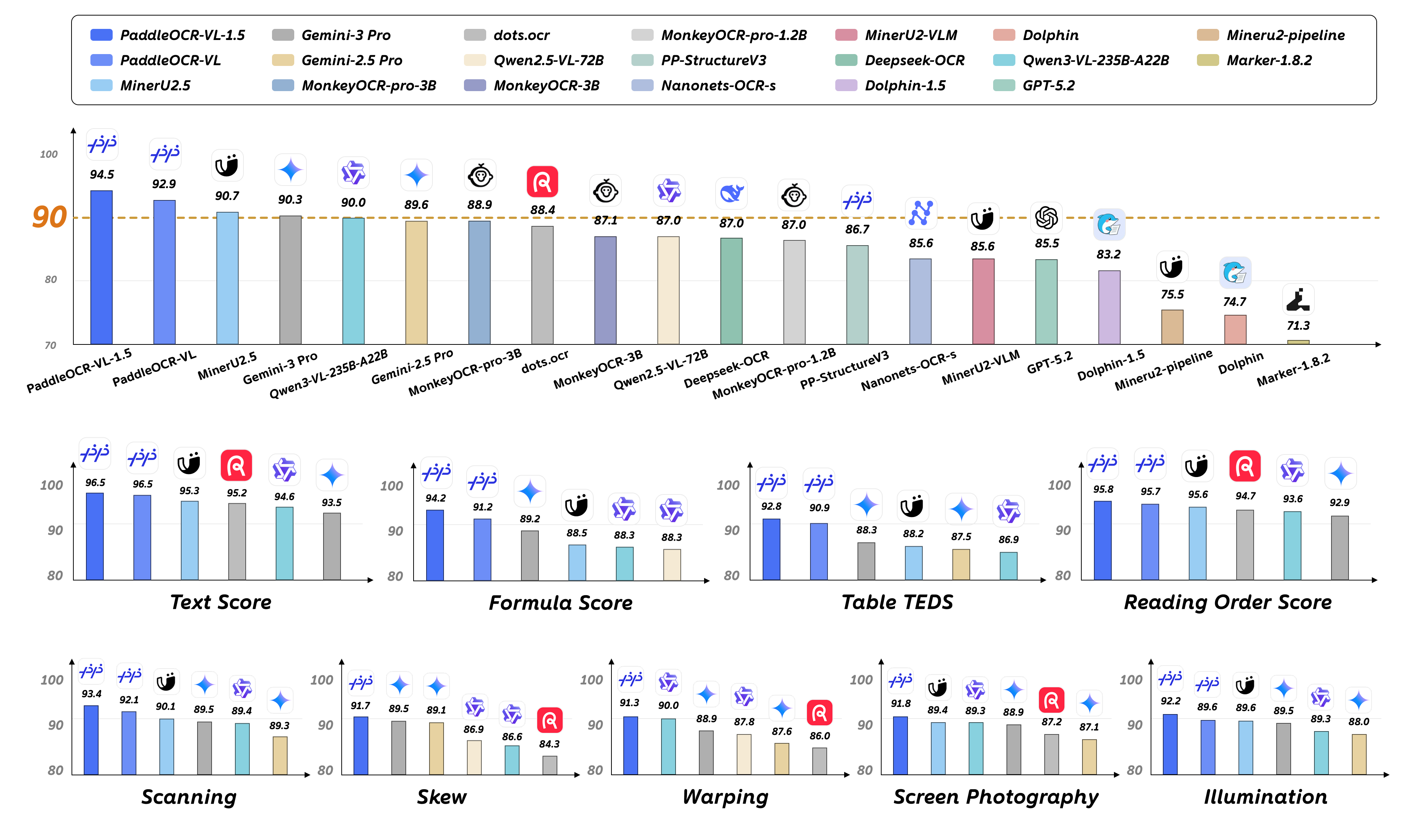
PaddleOCR-VL-1.5 is an advanced next-generation model of PaddleOCR-VL, achieving a new state-of-the-art accuracy of 94.5% on OmniDocBench v1.5. To rigorously evaluate robustness against real-world physical distortions—including scanning artifacts, skew, warping, screen photography, and illumination—we propose the Real5-OmniDocBench benchmark. Experimental results demonstrate that this enhanced model attains SOTA performance on the newly curated benchmark. Furthermore, we extend the model’s capabilities by incorporating seal recognition and text spotting tasks, while remaining a 0.9B ultra-compact VLM with high efficiency.
Install PaddlePaddle and PaddleOCR:
# The following command installs the PaddlePaddle version for CUDA 12.6. For other CUDA versions and the CPU version, please refer to https://www.paddlepaddle.org.cn/en/install/quick?docurl=/documentation/docs/en/develop/install/pip/linux-pip_en.html
python -m pip install paddlepaddle-gpu==3.2.1 -i https://www.paddlepaddle.org.cn/packages/stable/cu126/
python -m pip install -U "paddleocr[doc-parser]"
Please ensure that you install PaddlePaddle framework version 3.2.1 or above, along with the special version of safetensors. For macOS users, please use Docker to set up the environment.
Start the VLM inference server:
llama-server \
    -m /path/to/PaddleOCR-VL-1.5-GGUF.gguf \
    --mmproj /path/to/PaddleOCR-VL-1.5-GGUF-mmproj.gguf  \
    --port 8080  \
    --host 0.0.0.0 \
    --temp 0
Call the PaddleOCR CLI or Python API:
paddleocr doc_parser \
    -i https://paddle-model-ecology.bj.bcebos.com/paddlex/imgs/demo_image/paddleocr_vl_demo.png \
    --vl_rec_backend llama-cpp-server \
    --vl_rec_server_url http://127.0.0.1:8080/v1
from paddleocr import PaddleOCRVL
pipeline = PaddleOCRVL(vl_rec_backend="llama-cpp-server", vl_rec_server_url="http://127.0.0.1:8080/v1")
output = pipeline.predict("https://paddle-model-ecology.bj.bcebos.com/paddlex/imgs/demo_image/paddleocr_vl_demo.png")
for res in output:
    res.print()
    res.save_to_json(save_path="output")
    res.save_to_markdown(save_path="output")
For more usage details and parameter explanations, see the documentation.
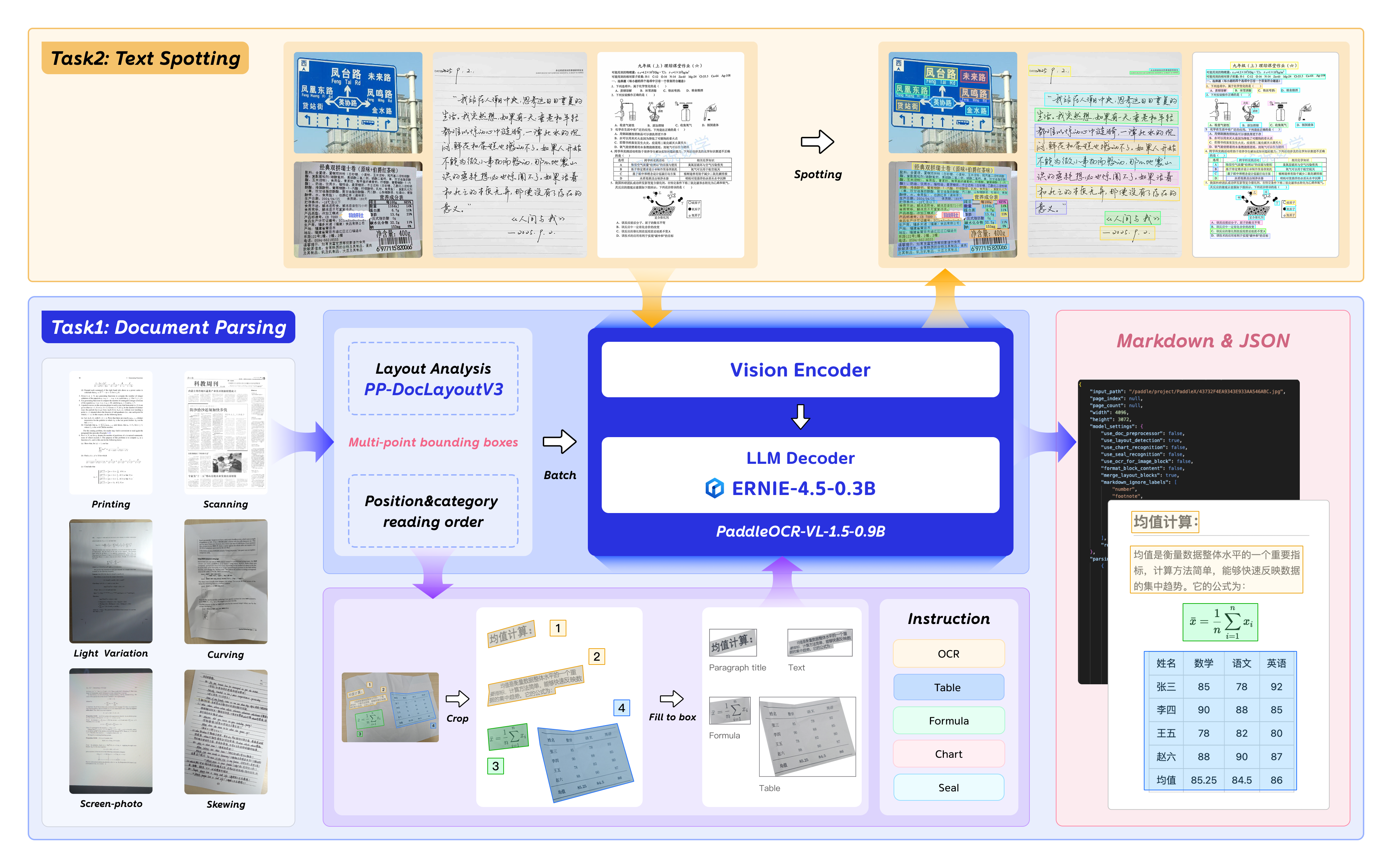
Currently, the PaddleOCR-VL-1.5-0.9B model facilitates seamless inference via the transformers library, supporting comprehensive text spotting and the recognition of complex elements including formulas, tables, charts, and seals. Below is a simple script we provide to support inference using the PaddleOCR-VL-1.5-0.9B model with llama.cpp.
We have six types of element-level recognition:
Text recognition, indicated by the prompt OCR:.
Formula recognition, indicated by the prompt Formula Recognition:.
Table recognition, indicated by the prompt Table Recognition:.
Chart recognition, indicated by the prompt Chart Recognition:.
Seal recognition, indicated by the prompt Seal Recognition:.
Spotting, indicated by the prompt Spotting:, and need to set image_max_pixels to 1605632:
git clone https://github.com/ggml-org/llama.cpp.git
cd llama.cpp
python -m pip install gguf
python ./gguf-py/gguf/scripts/gguf_set_metadata.py /path/to/PaddleOCR-VL-1.5-GGUF/PaddleOCR-VL-1.5-mmproj.gguf clip.vision.image_max_pixels 1605632 --force

# back to default value (1003520):
# python ./gguf-py/gguf/scripts/gguf_set_metadata.py /path/to/PaddleOCR-VL-1.5-GGUF/PaddleOCR-VL-1.5-mmproj.gguf clip.vision.image_max_pixels 1003520 --force
llama-cli \
    -m /path/to/PaddleOCR-VL-1.5-GGUF/PaddleOCR-VL-1.5.gguf \
    --mmproj /path/to/PaddleOCR-VL-1.5-GGUF/PaddleOCR-VL-1.5-mmproj.gguf \
    -p 'OCR:' \
    --image 'test_image.jpg'
llama-server -m /path/to/PaddleOCR-VL-1.5.gguf --mmproj /path/to/PaddleOCR-VL-1.5-GGUF/PaddleOCR-VL-1.5-mmproj.gguf --temp 0
We extend our gratitude to @megemini for their significant pull request, which adds support for PaddleOCR-VL-1.5-0.9B and PaddleOCR-VL-0.9B models to llama.cpp.
We're not able to determine the quantization variants.