Instructions to use continuum-ai/qwen3.5-4b-code-forged-GGUF with libraries, inference providers, notebooks, and local apps. Follow these links to get started.
- Libraries
- MLX
How to use continuum-ai/qwen3.5-4b-code-forged-GGUF with MLX:
# Make sure mlx-lm is installed # pip install --upgrade mlx-lm # if on a CUDA device, also pip install mlx[cuda] # Generate text with mlx-lm from mlx_lm import load, generate model, tokenizer = load("continuum-ai/qwen3.5-4b-code-forged-GGUF") prompt = "Once upon a time in" text = generate(model, tokenizer, prompt=prompt, verbose=True) - llama-cpp-python
How to use continuum-ai/qwen3.5-4b-code-forged-GGUF with llama-cpp-python:
# !pip install llama-cpp-python from llama_cpp import Llama llm = Llama.from_pretrained( repo_id="continuum-ai/qwen3.5-4b-code-forged-GGUF", filename="qwen3.5-4b-code-forged-Q4_K_M.gguf", )
output = llm( "Once upon a time,", max_tokens=512, echo=True ) print(output)
- Notebooks
- Google Colab
- Kaggle
- Local Apps
- llama.cpp
How to use continuum-ai/qwen3.5-4b-code-forged-GGUF with llama.cpp:
Install from brew
brew install llama.cpp # Start a local OpenAI-compatible server with a web UI: llama-server -hf continuum-ai/qwen3.5-4b-code-forged-GGUF:Q4_K_M # Run inference directly in the terminal: llama-cli -hf continuum-ai/qwen3.5-4b-code-forged-GGUF:Q4_K_M
Install from WinGet (Windows)
winget install llama.cpp # Start a local OpenAI-compatible server with a web UI: llama-server -hf continuum-ai/qwen3.5-4b-code-forged-GGUF:Q4_K_M # Run inference directly in the terminal: llama-cli -hf continuum-ai/qwen3.5-4b-code-forged-GGUF:Q4_K_M
Use pre-built binary
# Download pre-built binary from: # https://github.com/ggerganov/llama.cpp/releases # Start a local OpenAI-compatible server with a web UI: ./llama-server -hf continuum-ai/qwen3.5-4b-code-forged-GGUF:Q4_K_M # Run inference directly in the terminal: ./llama-cli -hf continuum-ai/qwen3.5-4b-code-forged-GGUF:Q4_K_M
Build from source code
git clone https://github.com/ggerganov/llama.cpp.git cd llama.cpp cmake -B build cmake --build build -j --target llama-server llama-cli # Start a local OpenAI-compatible server with a web UI: ./build/bin/llama-server -hf continuum-ai/qwen3.5-4b-code-forged-GGUF:Q4_K_M # Run inference directly in the terminal: ./build/bin/llama-cli -hf continuum-ai/qwen3.5-4b-code-forged-GGUF:Q4_K_M
Use Docker
docker model run hf.co/continuum-ai/qwen3.5-4b-code-forged-GGUF:Q4_K_M
- LM Studio
- Jan
- vLLM
How to use continuum-ai/qwen3.5-4b-code-forged-GGUF with vLLM:
Install from pip and serve model
# Install vLLM from pip: pip install vllm # Start the vLLM server: vllm serve "continuum-ai/qwen3.5-4b-code-forged-GGUF" # Call the server using curl (OpenAI-compatible API): curl -X POST "http://localhost:8000/v1/completions" \ -H "Content-Type: application/json" \ --data '{ "model": "continuum-ai/qwen3.5-4b-code-forged-GGUF", "prompt": "Once upon a time,", "max_tokens": 512, "temperature": 0.5 }'Use Docker
docker model run hf.co/continuum-ai/qwen3.5-4b-code-forged-GGUF:Q4_K_M
- Ollama
How to use continuum-ai/qwen3.5-4b-code-forged-GGUF with Ollama:
ollama run hf.co/continuum-ai/qwen3.5-4b-code-forged-GGUF:Q4_K_M
- Unsloth Studio new
How to use continuum-ai/qwen3.5-4b-code-forged-GGUF with Unsloth Studio:
Install Unsloth Studio (macOS, Linux, WSL)
curl -fsSL https://unsloth.ai/install.sh | sh # Run unsloth studio unsloth studio -H 0.0.0.0 -p 8888 # Then open http://localhost:8888 in your browser # Search for continuum-ai/qwen3.5-4b-code-forged-GGUF to start chatting
Install Unsloth Studio (Windows)
irm https://unsloth.ai/install.ps1 | iex # Run unsloth studio unsloth studio -H 0.0.0.0 -p 8888 # Then open http://localhost:8888 in your browser # Search for continuum-ai/qwen3.5-4b-code-forged-GGUF to start chatting
Using HuggingFace Spaces for Unsloth
# No setup required # Open https://huggingface.co/spaces/unsloth/studio in your browser # Search for continuum-ai/qwen3.5-4b-code-forged-GGUF to start chatting
- MLX LM
How to use continuum-ai/qwen3.5-4b-code-forged-GGUF with MLX LM:
Generate or start a chat session
# Install MLX LM uv tool install mlx-lm # Generate some text mlx_lm.generate --model "continuum-ai/qwen3.5-4b-code-forged-GGUF" --prompt "Once upon a time"
- Docker Model Runner
How to use continuum-ai/qwen3.5-4b-code-forged-GGUF with Docker Model Runner:
docker model run hf.co/continuum-ai/qwen3.5-4b-code-forged-GGUF:Q4_K_M
- Lemonade
How to use continuum-ai/qwen3.5-4b-code-forged-GGUF with Lemonade:
Pull the model
# Download Lemonade from https://lemonade-server.ai/ lemonade pull continuum-ai/qwen3.5-4b-code-forged-GGUF:Q4_K_M
Run and chat with the model
lemonade run user.qwen3.5-4b-code-forged-GGUF-Q4_K_M
List all available models
lemonade list
+22.7% Better at Code
Qwen3.5-4B forged for code through Experiential Plasticity.
3.04 โ 2.35 perplexity ยท 3 cycles
Every claim on this card is verified
Trust: self-attested ยท 2 benchmarks ยท 1 device tested
ForgeAlloy chain of custody ยท Download alloy ยท Merkle-chained
Qwen3.5-4B with cryptographic provenance via the ForgeAlloy chain of custody.
Benchmarks
| Benchmark | Result | Verified |
|---|---|---|
| perplexity | 22.7 | Self-reported |
| humaneval | pending | Self-reported |
What Changed (Base โ Forged)
| Base | Forged | Delta | |
|---|---|---|---|
| Perplexity (code) | 3.04 | 2.35 | -22.7% โ |
| Training | General | code, 1000 steps | LR 2e-4, 3 cycles |
| Pipeline | train โ quant โ eval โ quant | 3 cycles |
Runs On
| Device | Format | Size | Speed |
|---|---|---|---|
| NVIDIA GeForce RTX 5090 | fp16 | โ | Verified |
| MacBook Pro 32GB | fp16 | 8.0GB | Expected |
| MacBook Air 16GB | Q8_0 | ~4.0GB | Expected |
| MacBook Air 8GB | Q4_K_M | ~2.5GB | Expected |
| iPhone / Android | Q4_K_M | ~2.5GB | Expected |
Quick Start
from transformers import AutoModelForCausalLM, AutoTokenizer
model = AutoModelForCausalLM.from_pretrained("continuum-ai/qwen3.5-4b-code-forged-GGUF",
torch_dtype="auto", device_map="auto")
tokenizer = AutoTokenizer.from_pretrained("continuum-ai/qwen3.5-4b-code-forged-GGUF")
inputs = tokenizer("def merge_sort(arr):", return_tensors="pt").to(model.device)
output = model.generate(**inputs, max_new_tokens=200)
print(tokenizer.decode(output[0], skip_special_tokens=True))
Methodology
Produced via GGUF quantization. Full methodology, ablations, and per-stage rationale are in the methodology paper and the companion MODEL_METHODOLOGY.md in this repository. The pipeline ran as train โ quant โ eval โ quant over 3 cycles on NVIDIA GeForce RTX 5090.
Chain of Custody
Scan the QR or verify online. Download the alloy file to verify independently.
| What | Proof |
|---|---|
| Model weights | sha256:03dd512b17b85b9b4ee6614bc6dd46c08... |
| Code that ran | sha256:derivation-tool-o... |
| Forged on | NVIDIA GeForce RTX 5090, 2026-04-08 |
| Trust level | self-attested |
| Spec | ForgeAlloy โ Rust/Python/TypeScript |
Make Your Own
Forged with Continuum โ a distributed AI world that runs on your hardware.
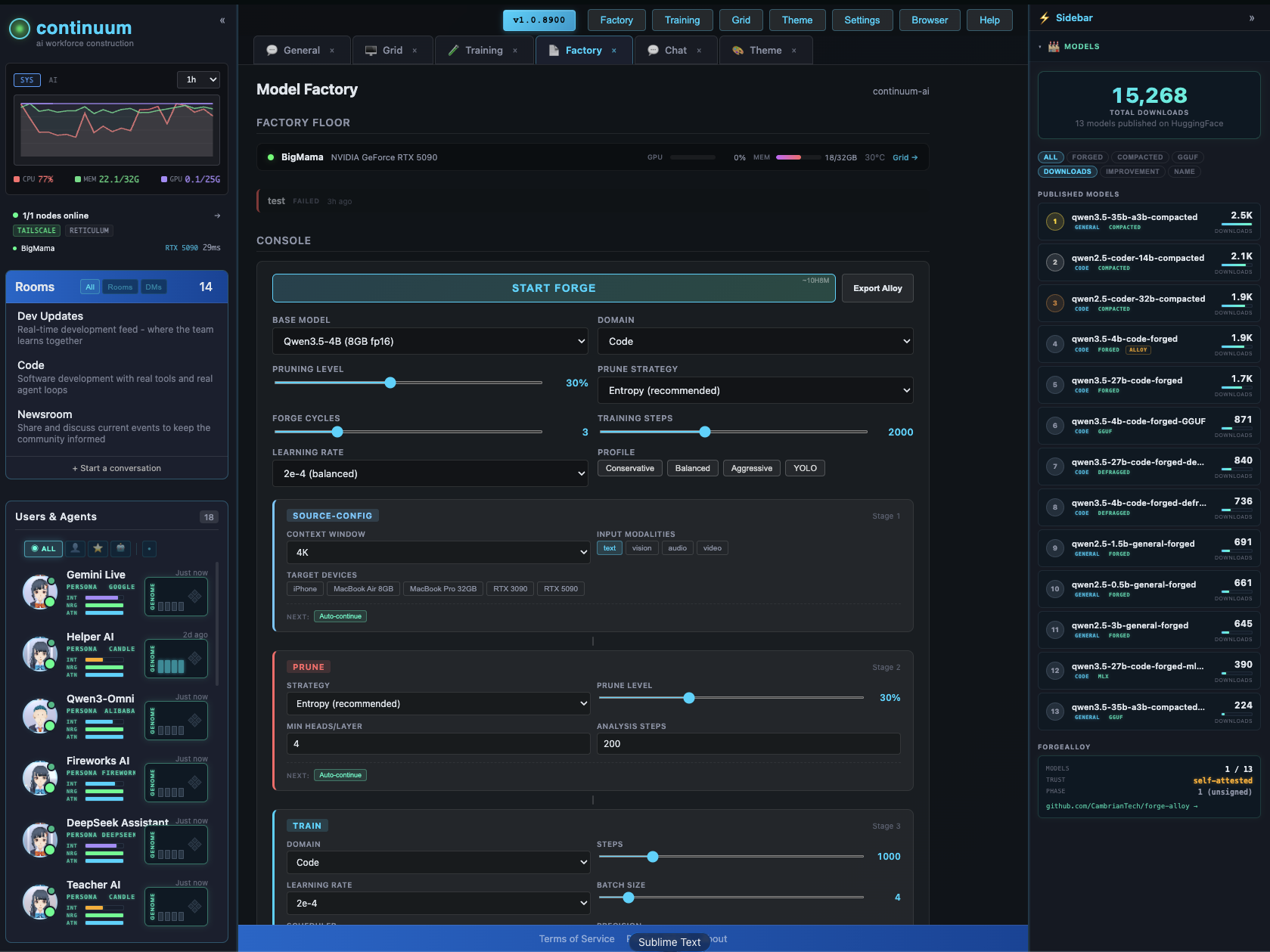
The Factory configurator lets you design and forge custom models visually โ context extension, pruning, LoRA, quantization, vision/audio modalities. Pick your target devices, the system figures out what fits.
GitHub ยท All Models ยท Forge-Alloy
License
apache-2.0
- Downloads last month
- 1,452
4-bit
8-bit
