


Unsloth Dynamic 2.0 Quants
Collection
New 2.0 version of our Dynamic GGUF + Quants. Dynamic 2.0 achieves superior accuracy & SOTA quantization performance. • 96 items • Updated • 620
llm.create_chat_completion(
	messages = [
		{
			"role": "user",
			"content": "What is the capital of France?"
		}
	]
)
Unsloth Dynamic 2.0 achieves superior accuracy & outperforms other leading quants.



You can follow instructions in our guide here.

👋 Join our WeChat or Discord community.
📖 Check out the GLM-5.1 blog and GLM-5 Technical report.
📍 Use GLM-5.1 API services on Z.ai API Platform.
🔜 GLM-5.1 will be available on chat.z.ai in the coming days.
GLM-5.1 is our next-generation flagship model for agentic engineering, with significantly stronger coding capabilities than its predecessor. It achieves state-of-the-art performance on SWE-Bench Pro and leads GLM-5 by a wide margin on NL2Repo (repo generation) and Terminal-Bench 2.0 (real-world terminal tasks).
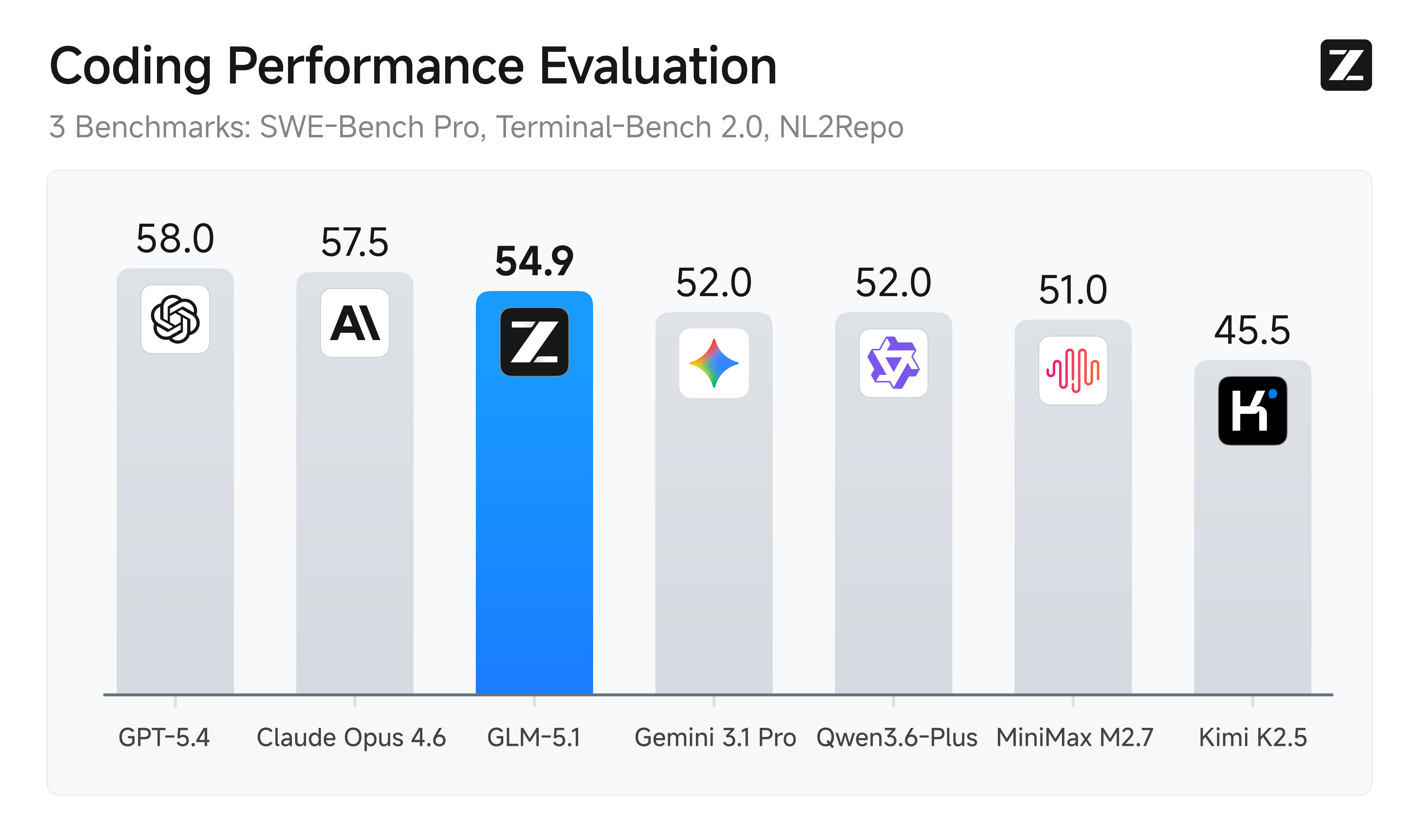
But the most meaningful leap goes beyond first-pass performance. Previous models—including GLM-5—tend to exhaust their repertoire early: they apply familiar techniques for quick initial gains, then plateau. Giving them more time doesn't help.
GLM-5.1, by contrast, is built to stay effective on agentic tasks over much longer horizons. We've found that the model handles ambiguous problems with better judgment and stays productive over longer sessions. It breaks complex problems down, runs experiments, reads results, and identifies blockers with real precision. By revisiting its reasoning and revising its strategy through repeated iteration, GLM-5.1 sustains optimization over hundreds of rounds and thousands of tool calls. The longer it runs, the better the result.
| GLM-5.1 | GLM-5 | Qwen3.6-Plus | Minimax M2.7 | DeepSeek-V3.2 | Kimi K2.5 | Claude Opus 4.6 | Gemini 3.1 Pro | GPT-5.4 | |
|---|---|---|---|---|---|---|---|---|---|
| HLE | 31.0 | 30.5 | 28.8 | 28.0 | 25.1 | 31.5 | 36.7 | 45.0 | 39.8 |
| HLE (w/ Tools) | 52.3 | 50.4 | 50.6 | - | 40.8 | 51.8 | 53.1* | 51.4* | 52.1* |
| AIME 2026 | 95.3 | 95.4 | 95.1 | 89.8 | 95.1 | 94.5 | 95.6 | 98.2 | 98.7 |
| HMMT Nov. 2025 | 94.0 | 96.9 | 94.6 | 81.0 | 90.2 | 91.1 | 96.3 | 94.8 | 95.8 |
| HMMT Feb. 2026 | 82.6 | 82.8 | 87.8 | 72.7 | 79.9 | 81.3 | 84.3 | 87.3 | 91.8 |
| IMOAnswerBench | 83.8 | 82.5 | 83.8 | 66.3 | 78.3 | 81.8 | 75.3 | 81.0 | 91.4 |
| GPQA-Diamond | 86.2 | 86.0 | 90.4 | 87.0 | 82.4 | 87.6 | 91.3 | 94.3 | 92.0 |
| SWE-Bench Pro | 58.4 | 55.1 | 56.6 | 56.2 | - | 53.8 | 57.3 | 54.2 | 57.7 |
| NL2Repo | 42.7 | 35.9 | 37.9 | 39.8 | - | 32.0 | 49.8 | 33.4 | 41.3 |
| Terminal-Bench 2.0 (Terminus-2) | 63.5 | 56.2 | 61.6 | - | 39.3 | 50.8 | 65.4 | 68.5 | - |
| Terminal-Bench 2.0 (Best self-reported) | 66.5 (Claude Code) | 56.2 (Claude Code) | - | 57.0 (Claude Code) | 46.4 (Claude Code) | - | - | - | 75.1 (Codex) |
| CyberGym | 68.7 | 48.3 | - | - | 17.3 | 41.3 | 66.6 | - | - |
| BrowseComp | 68.0 | 62.0 | - | - | 51.4 | 60.6 | - | - | - |
| BrowseComp (w/ Context Manage) | 79.3 | 75.9 | - | - | 67.6 | 74.9 | 84.0 | 85.9 | 82.7 |
| τ³-Bench | 70.6 | 69.2 | 70.7 | 67.6 | 69.2 | 66.0 | 72.4 | 67.1 | 72.9 |
| MCP-Atlas (Public Set) | 71.8 | 69.2 | 74.1 | 48.8 | 62.2 | 63.8 | 73.8 | 69.2 | 67.2 |
| Tool-Decathlon | 40.7 | 38.0 | 39.8 | 46.3 | 35.2 | 27.8 | 47.2 | 48.8 | 54.6 |
| Vending Bench 2 | $5,634.00 | $4,432.12 | $5,114.87 | - | $1,034.00 | $1,198.46 | $8,017.59 | $911.21 | $6,144.18 |
The following open-source frameworks support local deployment of GLM-5.1:
If you find GLM-5.1 or GLM-5 useful in your research, please cite our technical report:
@misc{glm5team2026glm5vibecodingagentic,
      title={GLM-5: from Vibe Coding to Agentic Engineering},
      author={GLM-5-Team and : and Aohan Zeng and Xin Lv and Zhenyu Hou and Zhengxiao Du and Qinkai Zheng and Bin Chen and Da Yin and Chendi Ge and Chenghua Huang and Chengxing Xie and Chenzheng Zhu and Congfeng Yin and Cunxiang Wang and Gengzheng Pan and Hao Zeng and Haoke Zhang and Haoran Wang and Huilong Chen and Jiajie Zhang and Jian Jiao and Jiaqi Guo and Jingsen Wang and Jingzhao Du and Jinzhu Wu and Kedong Wang and Lei Li and Lin Fan and Lucen Zhong and Mingdao Liu and Mingming Zhao and Pengfan Du and Qian Dong and Rui Lu and Shuang-Li and Shulin Cao and Song Liu and Ting Jiang and Xiaodong Chen and Xiaohan Zhang and Xuancheng Huang and Xuezhen Dong and Yabo Xu and Yao Wei and Yifan An and Yilin Niu and Yitong Zhu and Yuanhao Wen and Yukuo Cen and Yushi Bai and Zhongpei Qiao and Zihan Wang and Zikang Wang and Zilin Zhu and Ziqiang Liu and Zixuan Li and Bojie Wang and Bosi Wen and Can Huang and Changpeng Cai and Chao Yu and Chen Li and Chengwei Hu and Chenhui Zhang and Dan Zhang and Daoyan Lin and Dayong Yang and Di Wang and Ding Ai and Erle Zhu and Fangzhou Yi and Feiyu Chen and Guohong Wen and Hailong Sun and Haisha Zhao and Haiyi Hu and Hanchen Zhang and Hanrui Liu and Hanyu Zhang and Hao Peng and Hao Tai and Haobo Zhang and He Liu and Hongwei Wang and Hongxi Yan and Hongyu Ge and Huan Liu and Huanpeng Chu and Jia'ni Zhao and Jiachen Wang and Jiajing Zhao and Jiamin Ren and Jiapeng Wang and Jiaxin Zhang and Jiayi Gui and Jiayue Zhao and Jijie Li and Jing An and Jing Li and Jingwei Yuan and Jinhua Du and Jinxin Liu and Junkai Zhi and Junwen Duan and Kaiyue Zhou and Kangjian Wei and Ke Wang and Keyun Luo and Laiqiang Zhang and Leigang Sha and Liang Xu and Lindong Wu and Lintao Ding and Lu Chen and Minghao Li and Nianyi Lin and Pan Ta and Qiang Zou and Rongjun Song and Ruiqi Yang and Shangqing Tu and Shangtong Yang and Shaoxiang Wu and Shengyan Zhang and Shijie Li and Shuang Li and Shuyi Fan and Wei Qin and Wei Tian and Weining Zhang and Wenbo Yu and Wenjie Liang and Xiang Kuang and Xiangmeng Cheng and Xiangyang Li and Xiaoquan Yan and Xiaowei Hu and Xiaoying Ling and Xing Fan and Xingye Xia and Xinyuan Zhang and Xinze Zhang and Xirui Pan and Xu Zou and Xunkai Zhang and Yadi Liu and Yandong Wu and Yanfu Li and Yidong Wang and Yifan Zhu and Yijun Tan and Yilin Zhou and Yiming Pan and Ying Zhang and Yinpei Su and Yipeng Geng and Yong Yan and Yonglin Tan and Yuean Bi and Yuhan Shen and Yuhao Yang and Yujiang Li and Yunan Liu and Yunqing Wang and Yuntao Li and Yurong Wu and Yutao Zhang and Yuxi Duan and Yuxuan Zhang and Zezhen Liu and Zhengtao Jiang and Zhenhe Yan and Zheyu Zhang and Zhixiang Wei and Zhuo Chen and Zhuoer Feng and Zijun Yao and Ziwei Chai and Ziyuan Wang and Zuzhou Zhang and Bin Xu and Minlie Huang and Hongning Wang and Juanzi Li and Yuxiao Dong and Jie Tang},
      year={2026},
      eprint={2602.15763},
      archivePrefix={arXiv},
      primaryClass={cs.LG},
      url={https://arxiv.org/abs/2602.15763},
}
1-bit
2-bit
3-bit
4-bit
5-bit
6-bit
8-bit
16-bit
# !pip install llama-cpp-python from llama_cpp import Llama llm = Llama.from_pretrained( repo_id="unsloth/GLM-5.1-GGUF", filename="", )